
Website Application
for shipping
E-Import Entry License

DOCUMENTS
1. Invoice
2. Packing List
3. Bill of Lading / Air Waybill
4. Insurance Premium Invoice
5. Import and Export License
6. Certificate of Origin such as Form A, Form D, Form E
Step 1 : Checking import's documents for making E-Import Entry License Paperless
- Checking the details of goods which identified in documents such as Shipper's name, address, origin, condition of, Singnature, Shipping Marks, Net Weight and Ect.
- Checking Statistical Codes of Goods and Import Tax Rates of by following Thai Customs websites http://www.customs.go.th
- Checking import tax privilege such as FTA (Free Trade Area)
- Checking for license permits to institutes such as Department of Fisheries,, Department of Livestock Development, Food and Drug Administration(FDA) Department of Business Development (DBD), Department of Foreign Trade (DFT), Department of Internal Trade (DIT),
Department of International Trade Promotion (DITP)
Step 2 : Accessing to Web Application Service Provider for making E-Import Entry License Paperless
- To start by using the website source http://imex.edisiam.com
- Filling Customs Reference, User ID and Password, then press Enter to access the system

2.1

Accessing to the system, it is showed the home page as following :
1. Click to RTC Import
2. Click to Import Invoice
3. Click to Add items
2.2
1. Click to choose importer's company name
2. Fill the company's name
3. Fill consignment country
4. Fill origin country

2.3

1. Fill total net weight
2.Choose the currency
3. Fill the total amount invoice
4. Fill the amount insurance and freight
5. Fill the amount other charge and choose arrival date
6. Choose diff by weight
7. Click to save item
2.4
1. Fill to invoice no.e
2.Fill to purchase order number
3.Choose invoice date
4.Choose consignor's name
5. Fill to consignor's name

2.5

1. Fill to term of payment such as Free of Charge
2. Choose to trade terms such as FOB, FCA, CIF, EXW,CFR, CIP
3. Fill to total net weight of import's goods
4. Choose the currency
5. Fill the amount total invoice
6. Fill the amount insurance and freight
7. Choose the currency and fill the amount other charge
8. Fill to job no.
9. Click to save page
10.Click to item
2.6
1. Press kep tap to all duty
2. Click to save item
3. Click item continue to next page

Click to import declaration

2.7
Click to import declaration

Click to import declaration reference
2.8
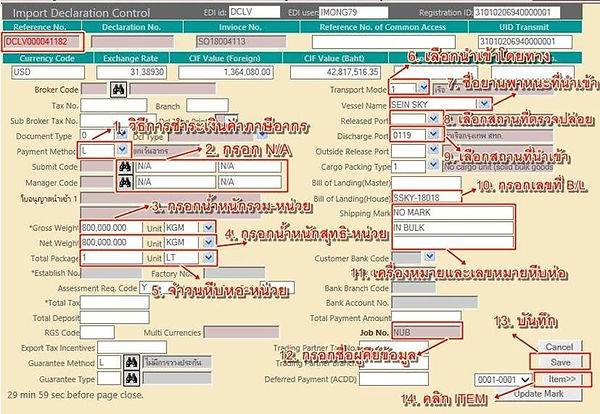
1. Choose tax payment method
2. Fill submit code and manager code
3. Fill the gross weight and unit
4. Fill the net weight and unit
5. Fill the total package of goods
6. Choose to transport mode
7. Fill vessel name
8. Choose code released port
9.Choose code discharge port
10. Fill bill of landing(house)
11. Fill shipping marks and package no.
12. Fill job no.
13. Click to save page
14. Click to item
2.9

1. Fill no. of package and unit
2. Click to choose the permit
3. Click to add item
2.10
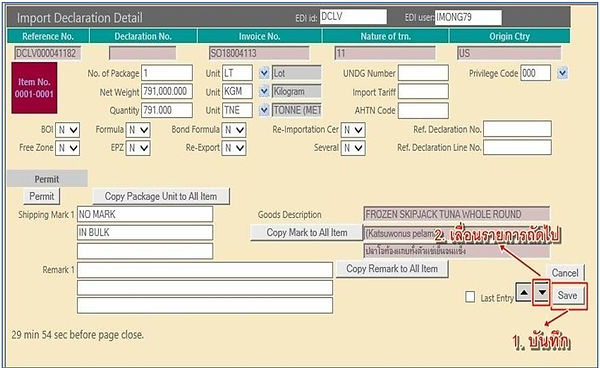
1. Click to save page
2.Click to continue to next item
2.11

1.Fill the refence no.
2. Click to the refrence
3. Click to the permit
4. Click to print
5. Click to import declaration pdf
6. Click to print import declaration license
2.12
E-Import Entry License Form
